Pet Cameras Worth Trusting While You’re Away
Furbo 360 Dog Camera ranks highest for dogs prone to barking, pairing a rotating 1080p lens with app controlled treat tossing. Wyze Cam Pan v3 is the value pick, adding motorized tracking most budget cameras skip. Eufy Indoor Cam E220 wins for owners who refuse a monthly plan, since it stores 2K footage locally.
A dog prone to separation anxiety needs more than a lens, and the Furbo 360 answers with barking alerts plus a treat tosser that interrupts the spiral. Cat households usually care more about coverage than snacks, which favors the pan and tilt motors on the Wyze Cam Pan v3. Owners avoiding subscriptions should look at the eufy Indoor Cam E220, since its 2K footage saves to a microSD card at no ongoing cost.
Pet cameras are hard to compare because the spec sheet rarely mentions what sits behind a paywall. A camera billed as smart can still limit recorded history to live view only, unless you pay monthly. We compared resolution, field of view, alert accuracy, storage options and running costs, and weighed owner reports on app reliability over marketing claims.
What we recommend

Furbo 360° Dog Camera
Furbo’s motorized base spins the lens to keep a roaming dog in frame at 1080p, even after dark thanks to color night vision. Tapping the app tosses a piece of kibble across the room, which trainers use to reward calm behavior during alone time. Bark alerts land on your phone within seconds, and the optional Furbo Nanny subscription layers on AI summaries without gating the core camera.
Pros
- Rotating base keeps a moving dog in frame
- Treat tosser rewards calm behavior remotely
- Bark alerts arrive fast enough to act on
Cons
- AI event summaries require the Nanny subscription
- Hopper is built for kibble, not soft treats

Petcube Bites 2 Lite
Mounted on a wall or shelf, this camera flings treats to a distance you set from the app, turning check-ins into a game of fetch the snack. A 160-degree lens covers most living rooms in 1080p without any motor. Its hopper holds weeks of kibble, so refills are rare.
Pros
- Adjustable fling distance adds real play value
- Wide lens covers a room without panning hardware
- Hopper needs infrequent refilling
Cons
- No motorized tracking for a moving pet
- Full alert history sits behind a paid plan

Wyze Cam Pan v3
Motion tracking follows a zooming cat across the room automatically, a feature few cameras offer at this price. Color night vision and an IP65 rating mean it handles a covered patio as easily as a living room. Local recording to a microSD card keeps footage flowing without a mandatory plan.
Pros
- Motorized tracking at a bargain price
- Rated for indoor or sheltered outdoor use
- Local storage skips monthly fees
Cons
- No treat dispensing or feeding features
- Motor makes an audible hum up close
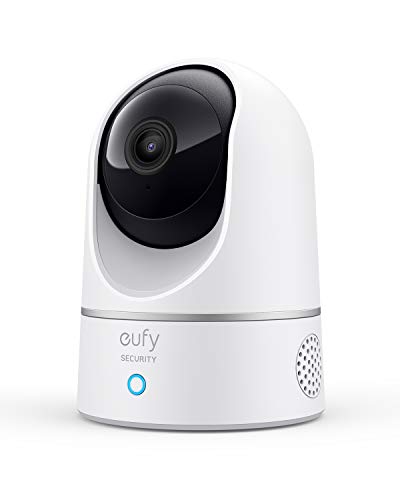
eufy Indoor Cam E220
A microSD card stores everything this camera records in 2K, with no plan required to view history. On-device AI tells pets from people, which cuts down on pointless notifications. Pan and tilt motors sweep the room and the camera pairs with Alexa, Google Assistant and HomeKit.
Pros
- Sharp 2K detail without recurring fees
- Pet-specific detection reduces alert spam
- Works across Alexa, Google and HomeKit
Cons
- microSD card sold separately
- No treat dispenser or bark-specific training tools

Blink Mini 2
Small enough for a bookshelf corner, this 1080p camera fills gaps a bigger camera misses, like a hallway or a crate room. A built-in spotlight adds color to night footage instead of the usual black and white. Alexa handles voice viewing, and clips save through a modest Blink plan or a Sync Module 2 for local storage.
Pros
- Fits spots larger cameras cannot reach
- Low cost per room makes multiples affordable
- Setup takes only a few minutes
Cons
- Fixed lens does not pan or tilt
- Best features assume an Alexa household

TP-Link Tapo C210
Recording 3MP video with a full 360-degree pan, the C210 accepts microSD cards up to 512GB for weeks of continuous footage. Motion alerts, a privacy mode and two-way audio all come free in the Tapo app. Multi-pet homes can add several without stacking subscriptions.
Pros
- Largest local storage ceiling here
- App features rivals charge for come free
- Affordable enough to cover every room
Cons
- App interface trails Furbo and eufy in polish
- No pet-specific AI detection

Ring Indoor Cam (2nd Gen)
Homes already running a Ring doorbell get pet coverage inside the same app and plan. A swiveling shutter physically blocks the lens for privacy when you are home. Video runs at 1080p with two-way talk, and clips land in the existing Ring timeline next to doorbell events.
Pros
- One app covers doorbell and pet views
- Physical shutter adds at-home privacy
- Notifications route through familiar Ring infrastructure
Cons
- Recording history effectively needs a plan
- No pan, tilt or treat features
How they stack up
| # | Model | Video | Best for | Score | Price |
|---|---|---|---|---|---|
| 1 | Furbo 360° Dog Camera | 1080p, 360-degree rotation | Best overall | 9.4 | Check price |
| 2 | Petcube Bites 2 Lite | 1080p, 160-degree lens | Best treat cam value | 9.2 | Check price |
| 3 | Wyze Cam Pan v3 | 1080p, 360-degree pan and tilt | Best budget | 9.0 | Check price |
| 4 | eufy Indoor Cam E220 | 2K, pan and tilt | Best subscription-free | 8.8 | Check price |
| 5 | Blink Mini 2 | 1080p, fixed lens | Best tiny second camera | 8.6 | Check price |
| 6 | TP-Link Tapo C210 | 3MP, 360-degree pan | Best value pan-tilt storage | 8.3 | Check price |
| 7 | Ring Indoor Cam (2nd Gen) | 1080p, fixed lens | Best for Ring households | 8.0 | Check price |
How to choose
What should you look for in a pet camera? Coverage comes first, since a fixed lens watches one corner while a pan and tilt motor sweeps the whole room. Two-way audio lets you calm a whining dog from your phone. Night vision matters most for pets left alone through evening shifts. Alert intelligence separates the field, because pet-aware AI like eufy’s ignores passing headlights and only flags real motion.
Is a treat-tossing camera worth it for dogs? Furbo and Petcube built their cameras around remote treats, and dogs with separation anxiety respond well since a tossed reward can break a bark cycle. Trainers warn against overuse, since some dogs start fixating on the machine instead of settling. Distance control on the Petcube Bites 2 Lite adds a game element rather than just a reward. Multi-dog homes should note neither tosser can target one dog over another.
Which pet cameras work best for cats? Cats mostly ignore tossed kibble, so the treat feature that sells dog owners adds little value here. Pan and tilt models like the Wyze Cam Pan v3 and eufy E220 track a cat moving between rooms, which a fixed lens cannot do. Perches, windowsills and litter areas are the zones worth aiming a lens at. Motion tracking also catches a cat knocking things off shelves, which owners often want documented.
How do you avoid a monthly camera subscription? Local storage is the way out of recurring fees. The eufy E220, Tapo C210 and Wyze Cam Pan v3 record continuously to microSD with full app access included. Ring and Blink work without a plan too, but they keep only live view and drop recorded history. Over several years, subscription costs can add up to more than the camera itself.
Common questions
Do pet cameras need a monthly subscription?
Not every one. The eufy Indoor Cam E220, Tapo C210 and Wyze Cam Pan v3 record to local microSD with no plan required. Furbo, Ring and Blink work without a subscription too, but they limit recorded history or AI features to paying users.
Can you talk to your dog through a pet camera?
Yes, all seven cameras here include two-way audio. Introduce the voice feature while you are home first, since a sudden disembodied voice can confuse a dog that has never heard it before.
Which pet camera is best for a barking dog?
The Furbo 360 Dog Camera, because it sends real time bark alerts and lets you respond with your voice or a tossed treat. Owners report it helps interrupt a bark spiral early, before a neighbor notices.
Are pet cameras good for cats?
Yes, though priorities shift. Cats roam more than dogs sit still, so pan and tilt tracking on the Wyze Cam Pan v3 or eufy E220 beats a fixed treat camera built for dogs.
How much video quality does a pet camera need?
1080p is enough to judge mood and behavior from across a room. 2K models like the eufy E220 add detail worth having when you need to see exactly what a dog is chewing.
Do pet cameras work during a Wi-Fi outage?
Live viewing needs an internet connection, since footage streams to your phone. Cameras with microSD storage, like the Wyze Cam Pan v3, keep recording locally and you can review the footage once the network returns.
What is the difference between a security camera and a pet camera?
Mostly overlap. Dedicated pet cameras add treat tossing and bark alerts, while general cameras like the Tapo C210 and Blink Mini 2 cover the same watching duties for less money.
Which pet camera has the best treat dispenser?
The Furbo 360 leads for dogs thanks to its rotating base and bark alerts, while the Petcube Bites 2 Lite offers adjustable-distance flinging and a bigger hopper for less.
Can a pet camera help with a puppy home alone?
Yes, especially one with two-way audio and alerts, since a young puppy needs more frequent check-ins than an adult dog. The Furbo 360 or Wyze Cam Pan v3 both suit short, frequent absences.
Is 2K better than 1080p for a pet camera?
It helps with detail at a distance, like spotting a swallowed object, but 1080p from cameras like the Furbo 360 is sharp enough for everyday monitoring. Bandwidth use is the tradeoff, since 2K streams use more data.
Final word
Dogs dealing with anxiety or frequent barking do best with the Furbo 360 Dog Camera, since its alerts and treat tosser address the behavior, not just the observation. Everyone else can cover a home for less with the Wyze Cam Pan v3, or skip subscriptions entirely with the eufy Indoor Cam E220. Favor local storage over cloud-only models if you plan to run cameras for years.


