How to Find the Right Replacement Streaming Remote
Roku Voice Remote Pro suits most households with rechargeable power and hands free search built in. Fire TV owners get an exact match with the Amazon Fire TV Replacement Remote. Anyone juggling several devices should look at the GE Universal Remote Control 33709 instead.
A missing streaming remote stops movie night faster than a dead battery ever could. Roku Voice Remote Pro covers most Roku boxes with voice search built in. Amazon Fire TV Replacement Remote matches Fire TV Stick and Fire Cube generations exactly. Budget shoppers do fine with the plainer Roku Simple Remote.
Pairing method causes most of the returns in this category, not build quality. Some remotes need Bluetooth pairing, others rely on infrared line of sight, and universal models require a code lookup step first. We compared pairing steps, button counts and owner reports on range and responsiveness across all seven.
Before you buy
What kind of replacement streaming remote do you actually need? Check whether the original remote paired over Bluetooth or relied on infrared first. Bluetooth remotes, common on newer Roku and Fire TV boxes, skip the line of sight requirement and often add voice search. Infrared remotes cost less but must point at the player to work. Matching this connection type avoids most compatibility problems.
Does the remote brand have to match the streaming box? Button layout and pairing process differ between platforms, so yes. A Roku remote will not pair with a Fire TV Stick, since each uses its own Bluetooth profile. Official replacements from the same brand pair fastest. Universal remotes sidestep this by using infrared codes instead of native pairing.
Best replacement remote for controlling multiple devices A streaming box alongside a separate TV and soundbar quickly outgrows a single device remote. Universal models like the GE 33709 or One For All Essence 4 combine up to four devices through code programming or an app guided setup. Fewer remotes end up on the coffee table this way. The tradeoff is a longer initial setup than a plug and play streaming remote.
What if only TV control is missing, not the streaming remote? A working streaming remote sometimes loses TV volume and power control after a TV swap or soundbar addition. A clip on option like the Sideclick attachment restores those functions without replacing a remote that still works fine. This suits anyone who does not want to relearn a new streaming button layout.
What we recommend

Roku Voice Remote Pro
Bluetooth and WiFi direct pairing mean commands work without pointing the remote at the box. A rechargeable battery replaces the usual AAA pair, charged over USB-C. A built in remote finder chirps through the TV speakers when misplaced, and voice search covers newer Roku players and Roku TVs.
Pros
- Works without line of sight to the box
- Rechargeable battery skips constant AAA purchases
- Remote finder locates it through TV audio
Cons
- Only pairs with newer Roku hardware
- Costs more than a basic replacement

Amazon Fire TV Replacement Remote
Sold directly by Amazon, this remote matches the button layout of Fire TV Stick and Fire TV Cube exactly. Bluetooth pairing takes about ten seconds after holding the home button. An infrared blaster also handles volume and power on most TVs, with an Alexa button for voice search.
Pros
- Exact button layout, no guesswork
- Alexa voice search built in
- Pairs to multiple Fire TV devices
Cons
- Does not work with Roku or Chromecast
- TV control needs an extra setup step

Roku Simple Remote
Roku sells this as its base replacement, dropping voice search and TV power buttons to hold down cost. Infrared connection means it needs a clear line of sight to the player. Shortcut buttons for Netflix and other apps sit in the same spots as the original box remote.
Pros
- Lowest cost way to replace a lost remote
- Familiar layout for existing Roku users
- No pairing steps to set up
Cons
- No voice search or TV volume control
- Line of sight limits where you sit

GE Universal Remote Control 33709
One unit here controls a streaming box, TV, soundbar and cable box through code programming. Setup runs off a printed code list or an auto search scan. Backlit buttons help during late movie sessions in a dark room.
Pros
- Replaces several remotes with one unit
- Backlit keys for low light rooms
- Works with most major TV and soundbar brands
Cons
- No voice control or app shortcuts
- Programming takes longer than plug and play models
One For All URC7935 Essence 4
Large, well spaced buttons target households mixing a streaming stick with an older TV and cable box. A smartphone app walks through setup instead of a printed code booklet. One touch activity switching moves between up to four devices without extra remotes on the table.
Pros
- App guided setup skips code lookup tables
- Large buttons suit limited dexterity
- One touch switching between devices
Cons
- No backlighting for dark rooms
- Limited streaming app shortcut buttons

Philips Universal Remote Control SRP9320
Oversized, high contrast buttons target older adults or anyone who wants fewer, clearer controls. It handles a TV plus one additional device, such as a streaming box. A compact included guide covers code setup for both.
Pros
- Large buttons reduce mis presses
- Straightforward two device setup
- Compact size fits most hands
Cons
- Controls fewer devices than 4-in-1 options
- No app shortcuts for streaming services
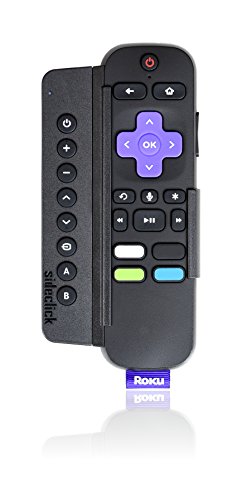
Sideclick Universal Remote Attachment
Rather than replacing a remote outright, this attachment clips onto an existing Roku or Fire TV remote. It adds TV volume, power and input buttons for anyone who kept their streaming remote but lost TV control after a soundbar swap. No separate batteries are needed since it draws power from the host remote.
Pros
- Keeps the original streaming remote intact
- Adds missing TV controls cheaply
- No separate battery or charging needed
Cons
- Only fits specific host remote shapes
- Does not replace a fully lost remote
How they compare
| # | Model | Connection | Best for | Score | Price |
|---|---|---|---|---|---|
| 1 | Roku Voice Remote Pro | Bluetooth and WiFi direct | Best overall | 9.4 | Check price |
| 2 | Amazon Fire TV Replacement Remote | Bluetooth low energy | Best for Fire TV devices | 9.1 | Check price |
| 3 | Roku Simple Remote | Infrared, line of sight required | Best value | 8.8 | Check price |
| 4 | GE Universal Remote Control 33709 | Infrared, line of sight required | Best for multiple devices | 8.5 | Check price |
| 5 | One For All URC7935 Essence 4 | Infrared, line of sight required | Best for TV and streaming combo | 8.3 | Check price |
| 6 | Philips Universal Remote Control SRP9320 | Infrared, line of sight required | Best for simple, large-button use | 8.1 | Check price |
| 7 | Sideclick Universal Remote Attachment | Infrared, riding on host remote | Best clip-on upgrade | 8.0 | Check price |
Frequently asked questions
How do I pair a replacement Roku remote?
Hold the pairing button, usually on the back or bottom, for about five seconds while the Roku player is on. A pairing screen appears on the TV within about thirty seconds of connecting.
Will a Fire TV remote work with a Roku device?
No, the two platforms use different pairing profiles and app protocols. A Fire TV remote only talks to Fire TV hardware, and a Roku remote only works with Roku players and Roku TVs.
Do universal remotes support voice search?
Some do, but most budget universal remotes skip voice control entirely. Check the listing for a microphone icon or a dedicated voice button before buying if hands free search matters.
Can I use my phone instead of a replacement remote?
Most streaming platforms offer a free companion app that mirrors remote functions over WiFi. It works as a temporary fix but lacks the tactile buttons and battery independence of a physical remote.
Why won’t my infrared remote control the streaming box?
Line of sight is the most common culprit, since infrared needs a clear path to the receiver. Check for obstructions, then confirm fresh batteries and, on a universal model, the correct device code.
Is a rechargeable streaming remote worth the extra cost?
For frequent voice search users, yes, since it skips repeated AAA battery purchases. Casual users who mainly navigate menus may not notice enough benefit to justify the price gap.
Do replacement remotes include batteries?
Most infrared and Bluetooth replacement remotes ship with the required AAA batteries. Rechargeable models include a USB-C cable instead of disposable batteries.
Can one universal remote replace both a TV and streaming remote?
Yes, models like the GE 33709 or One For All Essence 4 handle a TV, streaming box and up to two other devices from one unit. Setup still requires entering or scanning for the right codes.
What is the difference between Roku and Fire TV replacement remotes?
Roku remotes pair over a Roku specific Bluetooth profile and only work with Roku hardware. Fire TV remotes use their own Bluetooth profile plus an Alexa button, and only pair with Fire TV devices.
The verdict
Roku Voice Remote Pro delivers voice search and no line of sight hassle on compatible boxes. Fire TV households get an exact match with the Amazon Fire TV Replacement Remote instead. Anyone juggling a TV, soundbar and streaming box should skip single device remotes and go straight to the GE Universal Remote Control 33709.


