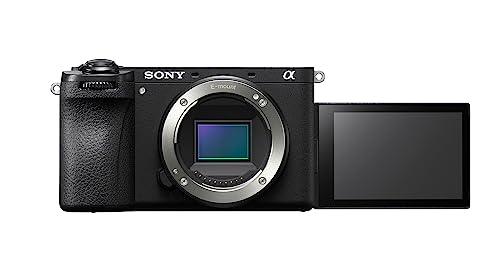
Cameras That Actually Look Good on Instagram Reels
The Sony ZV-E10 leads for Instagram Reels with its front flip screen, defocus button and strong built in mic. The DJI Osmo Pocket 3 wins on stabilisation, the Canon PowerShot G7X Mark III is the pocketable pick, and the Nikon Z30 covers value.
Talking to camera on Reels needs two things most bodies get wrong: a screen you can see while the lens faces you, and footage that stays steady when you move. The ZV-E10 covers both well, the Osmo Pocket 3 wins outright on smoothness, and the G7X Mark III slips into a pocket easier than either.
Reels punish a camera for missing either half of that equation. Many creator cameras nail the front screen but wobble on a walking shot, or steady the footage while leaving no way to check your framing. We compared flip screen designs, stabilisation methods, vertical recording support, built in mic quality and how each body feels held at arm’s length.
The top picks, ranked
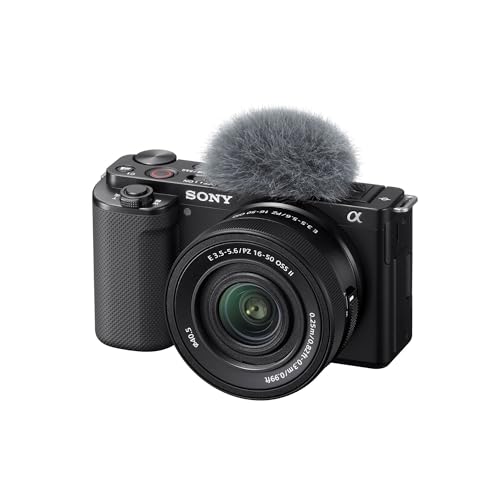
Sony ZV-E10
A fully articulating screen flips to the front so framing stays visible while you talk. One button triggers background defocus for an instant creator look. The built in directional mic, paired with a bundled windscreen, handles speech cleanly without extra gear, and interchangeable lenses let the body grow with your content.
Pros
- Front screen for filming yourself
- Strong built in directional mic
- Interchangeable lenses to grow into
Cons
- Electronic stabilisation crops the frame
- Rolling shutter on fast pans

DJI Osmo Pocket 3
A real motorised gimbal holds the camera steady, so footage stays glass smooth while walking or moving fast. Nothing in body here comes close to matching it. The screen rotates to vertical and the camera can spin to face you, purpose built for Reels, though the small sensor and fixed lens trade away some low light quality.
Pros
- Smoothest footage by a wide margin
- Rotates to true vertical framing
- Always in your pocket
Cons
- Small sensor struggles in low light
- Fixed lens with no optical zoom

Canon PowerShot G7X Mark III
This pocket compact launched countless creator channels, with a flip up screen for selfie framing and Canon’s flattering colour for talking clips. Vertical recording is supported, and a mic input is rare on a camera this small. Stabilisation is only fair, so it suits static talking shots more than walk and talk motion.
Pros
- Genuinely pocketable
- Flattering colour for talking clips
- Mic input on a tiny body
Cons
- Stabilisation weak for walking shots
- Screen tilts up, blocked by a mic
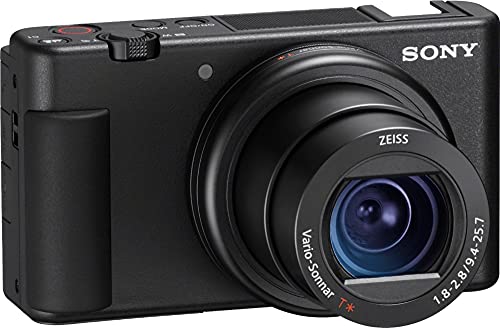
Sony ZV-1
Solo creators get a fixed lens compact with a front flip screen, a large record button and the same background defocus trick as its interchangeable sibling. A bright built in zoom and one inch sensor beat a phone for image quality, and the camera starts fast for catching a moment. Motion should stay gentle since it lacks a gimbal.
Pros
- Front screen and one button recording
- Good background defocus feature
- Pocketable with a bright lens
Cons
- Fixed lens limits framing
- Electronic stabilisation crops in

DJI Pocket 2
Gimbal smoothness carries over from the newer model at a noticeably lower price. The camera rotates and its app frames vertical clips cleanly, keeping walking shots steady where phones and mirrorless bodies wobble. A smaller sensor and a weaker low light ceiling are the trade offs for that stability and price.
Pros
- Gimbal smoothness for less money
- Rotates for vertical clips
- Tiny and always carried
Cons
- Small built in screen
- Weaker in low light

Panasonic Lumix G100
Panasonic built this one around a directional audio system that tracks whether you stand in front of or behind the camera, keeping speech clear without an external mic. A fully articulating front screen supports self framing, and vertical clips record natively. Stabilisation stays electronic and modest, so it favours talking shots over fast motion.
Pros
- Clever directional built in audio
- Front screen for self framing
- Compact and light to hold out
Cons
- Modest stabilisation for motion
- Smaller sensor in low light

Nikon Z30
Dropping the viewfinder lets the Z30 focus purely on content creation, with a fully articulating front screen, a comfortable grip for arm’s length holding and clean 4K for Reels. Interchangeable lenses at a low price give more room to grow than a fixed lens compact offers. A stabilised lens or steady hands keep clips smooth since the body has none of its own.
Pros
- Front screen and a real grip
- Interchangeable lenses at a low price
- Clean 4K for talking clips
Cons
- No in body stabilisation
- Can warm up in long 4K takes
How to choose
What actually makes a Reel watchable Two things decide whether a clip gets watched: steady motion and a visible screen while you talk. Miss either and viewers scroll past. Everything else, resolution, colour, megapixels, matters far less for a fifteen second clip than these two basics, so weigh a camera against them before anything else.
How stabilisation methods compare for walking shots A mechanical gimbal, like the one built into the Osmo Pocket 3, smooths footage no in body system can match. Mirrorless bodies rely on electronic stabilisation instead, which steadies handheld talking shots but crops the frame and struggles once you start walking. Match the method to how much you actually move while filming.
Front screens versus tilt up screens Most Reels involve talking straight into the lens, so a forward facing screen is not optional. Fully articulating screens that flip all the way to the front, as on the ZV-E10 and Z30, clear the top of the camera for a mounted mic. Tilt up designs like the G7X work fine until an accessory sits in the hot shoe and blocks the view.
Vertical framing and built in audio DJI’s pocket cameras physically rotate to shoot true vertical, the cleanest approach available. Most mirrorless bodies record horizontally with vertical framing support, leaving you to crop in editing, which works with a little planning ahead. On audio, the Panasonic G100 and Sony ZV bodies carry directional mics capable enough for speech alone, while windy locations still call for an external mic through the input jack.
Side by side
| # | Model | Video | Best for | Score | Price |
|---|---|---|---|---|---|
| 1 | Sony ZV-E10 | 4K up to 30p, vertical supported | Best overall | 9.4 | Check price |
| 2 | DJI Osmo Pocket 3 | 4K, rotates to vertical | Best for stabilisation | 9.2 | Check price |
| 3 | Canon PowerShot G7X Mark III | 4K, vertical supported | Best pocket compact | 8.9 | Check price |
| 4 | Sony ZV-1 | 4K up to 30p, vertical supported | Best point and shoot vlog | 8.7 | Check price |
| 5 | DJI Pocket 2 | 4K, vertical via app | Best budget gimbal | 8.4 | Check price |
| 6 | Panasonic Lumix G100 | 4K, vertical supported | Best for audio | 8.2 | Check price |
| 7 | Nikon Z30 | 4K up to 30p, vertical supported | Best value | 8.0 | Check price |
Good to know
What is the most important feature for a Reels camera?
Stabilisation and a front facing screen matter most. Smooth footage keeps viewers watching, and seeing yourself while the lens points at you is the only way to stay framed correctly.
Which camera gives the smoothest footage for Reels?
The DJI Osmo Pocket 3, because a real motorised gimbal replaces electronic correction. Footage stays smooth even while walking, a feat no in body system in this list matches.
Do I need a camera that shoots true vertical video?
It helps but is not essential. DJI’s pocket cameras rotate to shoot vertical directly, the cleanest method. Mirrorless bodies record horizontally with vertical framing in mind, and cropping in editing works fine with planning.
Which camera has the best front facing screen setup?
Fully articulating screens that flip to the front, found on the Sony ZV-E10, Nikon Z30 and Panasonic G100, stay clearest of a hot shoe mic. Tilt up screens can get blocked once a mic is attached.
Is the built in microphone good enough for Reels?
On the Panasonic G100 and Sony ZV bodies, often yes, since their directional mics handle speech well at arm’s length. Wind or background noise still calls for a small external mic through the input jack.
Can a mirrorless camera match a gimbal for smoothness?
Not while walking. Electronic and in body stabilisation steady handheld talking clips but crop the frame and cannot match mechanical gimbal motion. Static or lightly moving Reels stay smooth enough on mirrorless alone.
Do Reels cameras overheat during filming?
Rarely, since Reels run short. Bodies like the Nikon Z30 can warm up across long continuous 4K sessions, but that limit almost never applies to typical Reel length clips.
What is the best budget camera for Reels?
The Nikon Z30 among interchangeable lens cameras, or the DJI Pocket 2 for gimbal smoothness at a lower price. The Z30 offers more room to grow, while the Pocket 2 wins outright on stabilisation for the money.
Is a pocket gimbal camera better than a mirrorless camera for Reels?
For walking and motion shots, yes, since a gimbal camera stays smoother. For talking directly to camera with background blur, a mirrorless body like the ZV-E10 gives more control over the image.
How much does sensor size matter for Instagram Reels?
Less than stabilisation and screen design for most creators. A larger sensor helps in dim rooms, but a shaky or badly framed clip looks worse than a slightly noisier steady one.
The bottom line
The Sony ZV-E10 suits most creators best, pairing a front flip screen and background blur with a built in mic strong enough to skip extra gear. Anyone filming while walking should choose the DJI Osmo Pocket 3 instead, since its gimbal smoothness has no real rival here. Creators who prioritise pocketability still get a capable option in the Canon PowerShot G7X Mark III.